NAVLOG Routing
The Leg Information system provides pilots with a structured, editable overview of each LEG in a SkyWalk route. It combines pre‑flight planning data with real‑time GPS‑based updates, safety validation, and automatic recalculation of performance metrics.
|
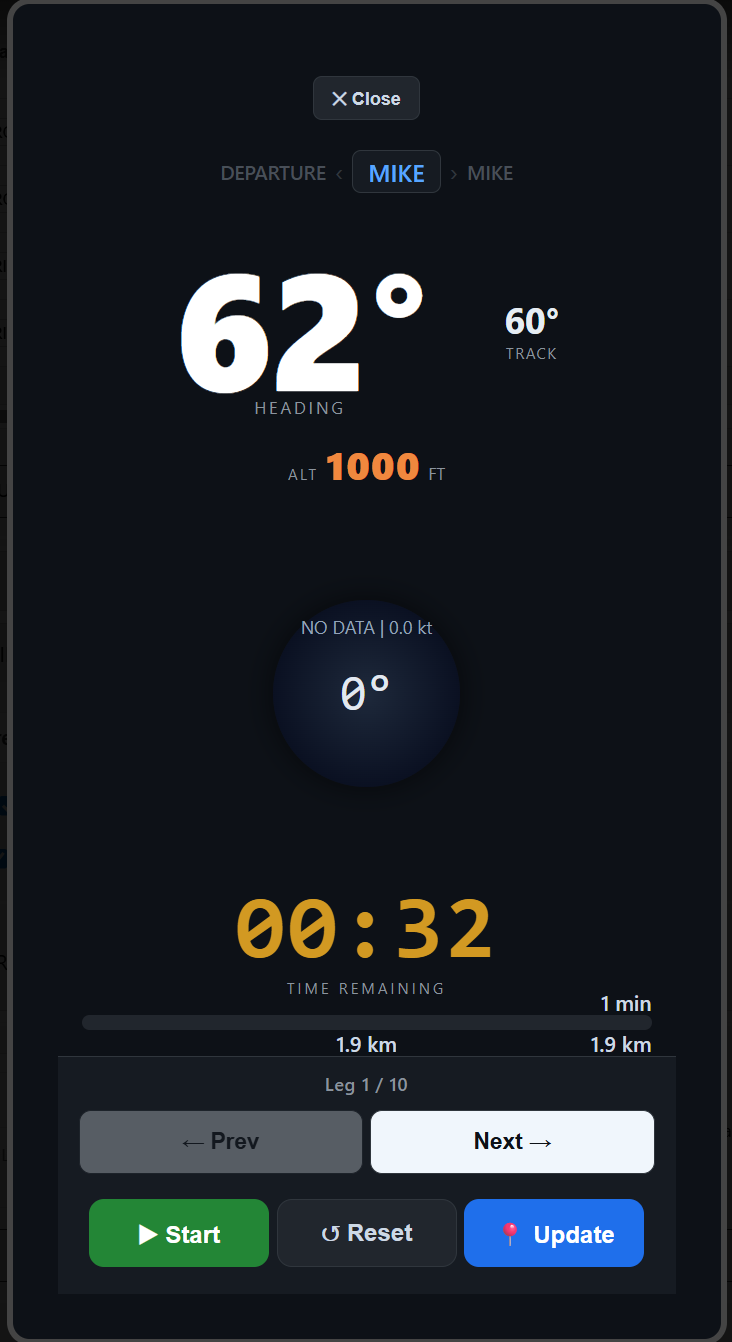
Timer System
SkyWalk uses a unified play/pause button and a leg‑based timer to track progress and support safety checks. The checkbox “GPS Compass” shows the GPS location from you mobile device. The checkbox “Haptic Feedback” makes vibrations in the last 3 seconds of the LEG and when the LEG is finished.
Leg Start Time Tracking
A timestamp is stored when the pilot taps Start. It is used for:
Elapsed‑time calculations
Time‑vs‑distance safety validation
The timestamp is cleared on reset or when switching legs.
Vibration Alerts
SkyWalk uses the device’s vibration motor (where supported) to provide tactile countdown cues.
Countdown Alerts
During the final three seconds of a leg:
3 seconds remaining → one buzz
2 seconds remaining → two buzzes
1 second remaining → three buzzes
Leg Completion Alert
At 0 seconds:
- short – short – long
80 ms
80 ms
300 ms
Unsupported devices (e.g., iOS Safari) silently ignore vibration requests.
Safety Checks
The NAVLOG GUI provides a structured overview of each navigation LEG in a SkyWalk route. Each leg contains both editable and computed fields.
GPS Update
When the pilot taps Update, the GPS of the mobile phone will be used to refresh heading, track, wind correction, and time‑remaining based on real‑time device position and speed. The following steps are performed to get accurate information:
GPS Fix Acquisition - One‑shot get current position - High‑accuracy mode, 10 s timeout
Speed Comparison - If GPS speed differs from planned ground speed by more than 15 kt,
a confirmation dialog displays both values and allows the pilot to choose.
Distance & Bearing Recalculation - Computes distance to destination and new bearing from current position.
METAR Integration - Retrieves nearest METAR station - Extracts wind direction and speed - Computes:
Headwind
Crosswind
Wind Correction Angle (WCA)
Recomputes corrected magnetic heading.
Live UI Refresh - Heading and track - Remaining distance - Time remaining - Progress bar values - Countdown timer
All updates occur without leaving the current leg.
Safety Validation System
There are various safety checks before applying any GPS‑based update. SkyWalk runs a comprehensive validation routine that should prevents incorrect LEG updates and warns the pilot when conditions appear inconsistent.
Hard Blocks
These conditions immediately cancel the update:
- Along‑Track Position
Aircraft is < −10% or > 115% of leg length.
- Heading Reversal
New track differs > 120° from planned.
- Distance Mismatch
Remaining distance > 140% of original leg distance.
- GPS Accuracy (Poor)
Accuracy > 500 m.
Soft Warnings
These conditions show a confirmation dialog; the pilot may override:
- Overshoot
< 0.3 km remaining.
- Cross‑Track Error
> 15% of leg length (minimum 2 km).
- GPS Accuracy (Medium)
200–500 m accuracy.
- Time vs Distance Consistency
After 30 s and 0.5 km:
Implied GS < 40% or > 200% of planned.
Negative progress after 60 s.
These checks help ensure the pilot is updating the correct leg and that the GPS data is reliable enough to compute a new heading.